Structured Output
Configure your agent to return structured JSON responses
Structured output allows your agent to return responses in a specific JSON format that you define. This is essential when integrating agents into applications that need predictable, parseable data rather than free-form text.
When to Use Structured Output
Structured output is useful when:
- API integrations: Your agent powers an API endpoint that needs consistent response formats
- Data extraction: The agent processes documents and extracts specific fields
- Workflow automation: Responses feed into downstream systems that expect specific data shapes
Configuring Output Schema
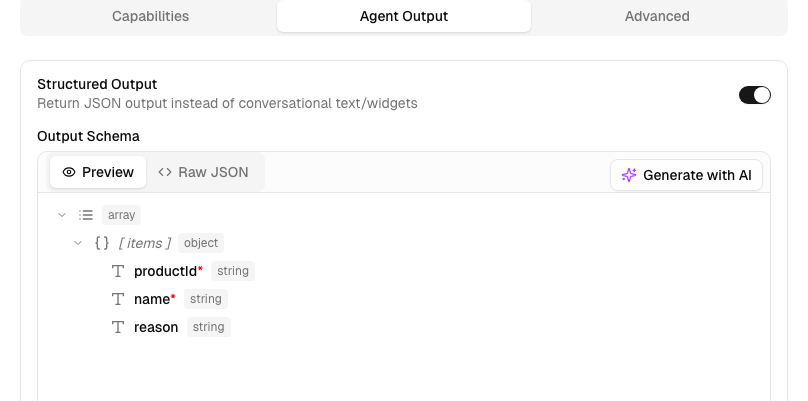
To enable structured output, edit the Agent and go to Agent Output tab:
Defining the Schema
The output schema uses JSON Schema format. Here's an example for a product recommendation agent:
{
  "type": "object",
  "properties": {
    "recommendations": {
      "type": "array",
      "items": {
        "type": "object",
        "properties": {
          "productId": {
            "type": "string",
            "description": "The unique product identifier"
          },
          "name": {
            "type": "string",
            "description": "Product name"
          },
          "reason": {
            "type": "string",
            "description": "Why this product is recommended"
          },
          "confidence": {
            "type": "number",
            "description": "Confidence score between 0 and 1"
          }
        },
        "required": ["productId", "name", "reason"],
        "additionalProperties": false
      }
    },
    "summary": {
      "type": "string",
      "description": "A brief summary of the recommendations"
    }
  },
  "required": ["recommendations", "summary"],
  "additionalProperties": false
}
Schema Constraints
Due to LLM structured output limitations, certain JSON Schema features are restricted:
| Constraint | Requirement |
|---|---|
additionalProperties | Must be false on all object types |
minItems | Only 0 or 1 supported for arrays |
minimum / maximum | Not supported for integer type |
Schema Best Practices
- Add descriptions: Include
descriptionfields to help the model understand what each property should contain - Use required fields: Mark essential fields as
requiredto ensure they're always present - Always set
additionalProperties: false: Required on every object type in your schema - Use enums for fixed choices: Use
"enum": ["option1", "option2"]for constrained values - Keep it focused: Only include fields the agent can reasonably populate
Examples
Customer Support Triage
{
  "type": "object",
  "properties": {
    "category": {
      "type": "string",
      "enum": ["billing", "technical", "account", "general"],
      "description": "The category of the support request"
    },
    "priority": {
      "type": "string",
      "enum": ["low", "medium", "high", "urgent"],
      "description": "Urgency level of the request"
    },
    "suggestedActions": {
      "type": "array",
      "items": { "type": "string" },
      "description": "Recommended next steps"
    }
  },
  "required": ["category", "priority"],
  "additionalProperties": false
}
Content Analysis
{
  "type": "object",
  "properties": {
    "sentiment": {
      "type": "string",
      "enum": ["positive", "neutral", "negative"]
    },
    "topics": {
      "type": "array",
      "items": { "type": "string" }
    },
    "keyPhrases": {
      "type": "array",
      "items": { "type": "string" }
    },
    "language": {
      "type": "string",
      "description": "Detected language code (e.g., 'en', 'es')"
    }
  },
  "required": ["sentiment", "topics"],
  "additionalProperties": false
}
Related
- Invoke API - How to call your agent programmatically
- Authentication - Securing your API requests