Referencing Versions
This page explains how to select a versioned resource e.g. when connecting the chat to your agent or when an agent references a tool
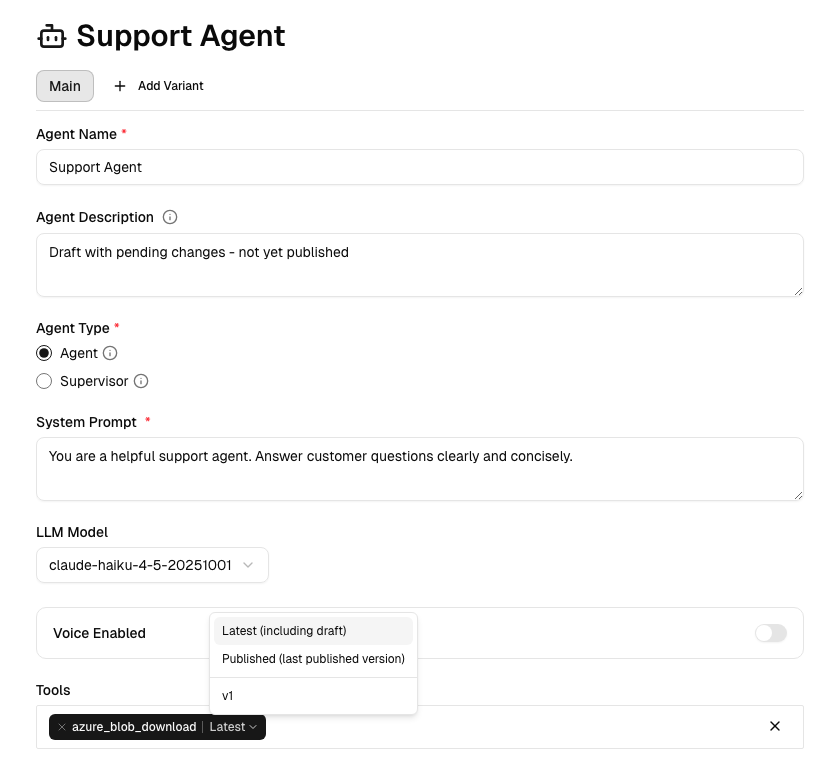
When connecting agents to tools or embedding the chat widget, you choose how to reference versions:
| Reference | Resolves To | Use Case |
|---|---|---|
latest | Current draft, fallback to last published version | Development, Testing |
published | Last published version, fallback to draft | Production |
1, 2, etc. | Specific version | Pinned deployments |
By default latest is used when selecting a resource or when omitted, allowing faster development iteration. published or pinned version should be used when referencing a resource in Production.
Example: Agent referencing a tool
Example: Chat widget references a versioned agent
<ChatWidget
  agentId="abcd-1234"
  version="published"  // `latest` used if omitted
/>
When to Publish
Publish when you're confident your changes are ready for production:
- Feature is complete and tested
- No breaking changes to existing behavior
- You want to lock down changes or create a stable snapshot
You don't need to publish for every small change during development. The draft is your sandbox.
Best Practices
Use pinned 1, 2, .. Selecting a specific version ensures stability and protects against changes. You run into the risk of not getting further changes automatically (e.g. patched vulnerability on later versions)
Use published. Pick the last published version. If no published version is found, this will fallback to draft. This is a good balance between stability and adopting features.
Use latest. Pick the draft version. If no draft version is found, this will fallback to the last published version. Use this for bleeding edge development, with the understanding that changes to draft might break your workflow.